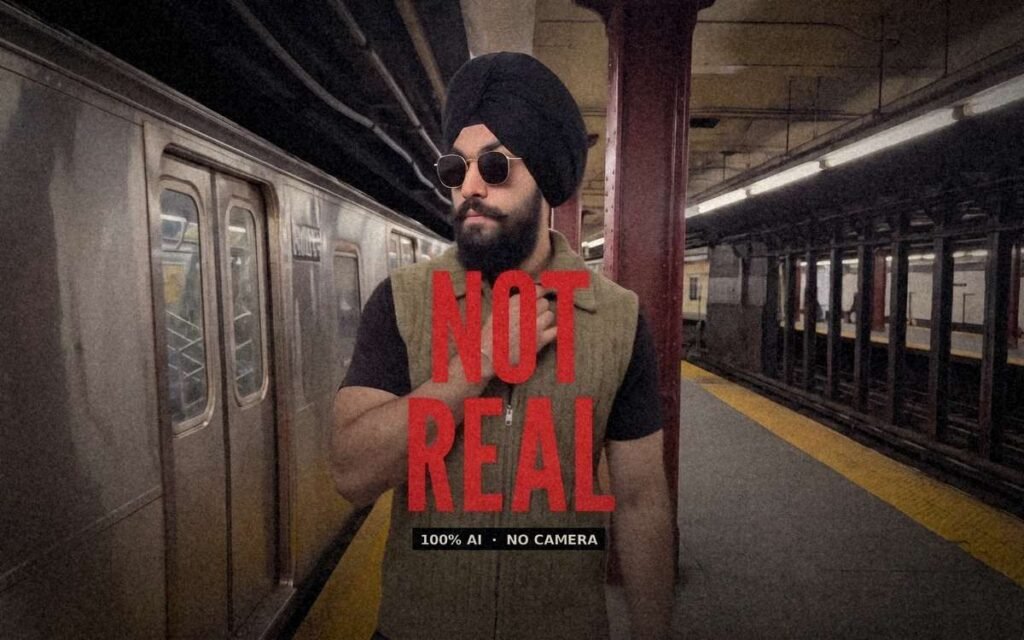
Copy this promptEdit Video 1. Replace the man in the burgundy Renaissance costume with the person in Image 1, and make them lip-sync the song in Video 1. Image 1 supplies the complete character, including identity, face, body, anatomy, silhouette and clothing, with nothing kept from the source figure. Keep the subway train, commuters, platform, signage and all other environment details from Video 1. Video 1 controls the original performance, blocking, interactions, camera movement, framing, cuts, timing and audio; everything outside the listed replacement keeps its look and sound from Video 1.
REFERENCES
Image 1: [describe yourself: height and build, hairstyle or headwear, facial hair, glasses, top, trousers or skirt, shoes and accessories, e.g. "a tall man with short black hair, full beard, round glasses, a denim jacket over a white T-shirt, black jeans, white sneakers and a silver watch"]. Use their complete face, height, body proportions, clothing and accessories.
AUDIO AND LIP-SYNC
Keep the original song from Video 1 exactly: same vocals, lyrics, rhythm, volume and timing, with no new music, voices or sound effects. The person sings every line the source performer sings, with mouth shapes matched syllable by syllable: lip closures on M, B and P sounds, open mouth on long vowels, natural jaw movement and visible breathing. Their lips stay in sync while they walk, turn and sprint, with no lag, drift or frozen mouth. Any facial hair moves naturally with their jaw.
SOURCE VIDEO
Video 1 shows the performer rushing to a stationary subway car, pressing both palms to its window, then after a hard cut singing and reacting to camera before accelerating into a sprint along the platform and exiting as the camera whip-pans to a tiled wall. Keep the hard cut at 2.6s and the final whip-pan exactly in place.
SHOTS
Shot 1 (0.0–2.6s, continuous): Medium full handheld tracking shot from behind and side. The person moves from center toward mid-right beside the train on the left, taking long strides along the yellow tactile strip, keeping their height and proportions from Image 1. At 1.2s they reach the window, face it and press both open palms flat to the glass, then tap it in dramatic distress, lip-syncing wherever the source performer sings. [Their accessories, e.g. glasses or a cap] stay securely in place. Hard cut.
Shot 2 (2.6–5.2s, hard cut): Medium close-up, head and upper torso fill the frame, no full legs. The person faces camera at center, turns from the train, puts one hand to their chest and sings the line toward camera with a wide, expressive open-mouthed delivery, matching the source performer's expression and mouth shapes exactly. Keep their face, hair or headwear, facial hair, clothing and accessories identical to Image 1; they begin moving forward.
Shot 3 (5.2–11.6s, continuous): Handheld medium shot tracking backward and beside them. The person accelerates, then sprints left to right down the platform past maroon columns and the staircase, with long strides, arms pumping and clothing moving naturally, singing mid-run with breathless, energetic delivery and turning their head back toward camera. Their hair or headwear and accessories remain firmly in place. The train stays deep in the background on the left from 6.8s onward, partly hidden by columns.
Shot 4 (11.6–12.2s, continuous): The person exits right/forward. The camera pans across the empty white tiled wall and ends in a fast, blurred whip-pan.
PROPS
[List any accessories from Image 1, e.g. "rigid metal sunglasses with dark lenses" or "a silver watch"]. Each accessory keeps its exact shape and stays correctly placed in every frame, including during the chest touch and sprint.
SETTING
Keep the original nighttime New York subway platform from Video 1: stainless steel train, yellow tactile edge strip, maroon steel columns, white tiled walls, staircase railings, commuters and cool fluorescent overhead light.
NEGATIVE
No extra people, no duplicated or cloned characters, no hybrid of source and target bodies, no source Renaissance costume or wig left over, no missing or changed features from Image 1 (hair, headwear, facial hair, glasses or accessories), no lip-sync lag, no mouth drift, no frozen or blurred mouth, no changed song or added voices, no morphing or melting objects, no gibberish text, no extra cuts, no new camera moves, no slow motion, no subtitles, no source person in the last shot, clean frame edge to edge.
The tool button is an affiliate link. If you sign up through it, I may earn a small commission at no extra cost to you.